
Screenshots




App details
- Updated
- Aug 28, 2012
- Language
- English
- Category
- Mobile
SoftPas in:
This product is also available in the following languages:
About PostureMinder
Download PostureMinder – Posture Correction, Back Pain Relief, Neck Pain Prevention
Overview
PostureMinder is a mobile application designed to support individuals who spend extended periods seated at a desk, particularly those working remotely or in office environments. The app focuses on promoting long-term musculoskeletal health by offering actionable advice for maintaining proper posture and preventing common issues such as back and neck strain. By integrating real-time feedback through a webcam-based calibration system, PostureMinder enables users to monitor and adjust their sitting position throughout the day. This proactive approach helps reduce the risk of chronic discomfort associated with prolonged sedentary behavior.
Target users include remote workers, office employees, students, and anyone engaged in desk-based activities. The app’s emphasis on regular movement through scheduled break reminders further enhances its value in combating the negative effects of inactivity. While the developer, PostureMinder LLC, is not known for other widely recognized applications, the app’s specific focus on ergonomic wellness positions it as a niche yet practical tool within the health and fitness category. Its longevity—first released in 2012—suggests a stable, continuously maintained product that has evolved to meet user needs over time.
Real-world use cases include daily desk workers using the app to correct slouching during video calls, remote employees seeking to improve their home office setup, and individuals recovering from posture-related discomfort. In the broader app ecosystem, PostureMinder fills a gap in digital wellness tools by combining behavioral nudges with visual feedback, making it a valuable addition to a health-conscious user’s digital toolkit.
Key Features & Functionality
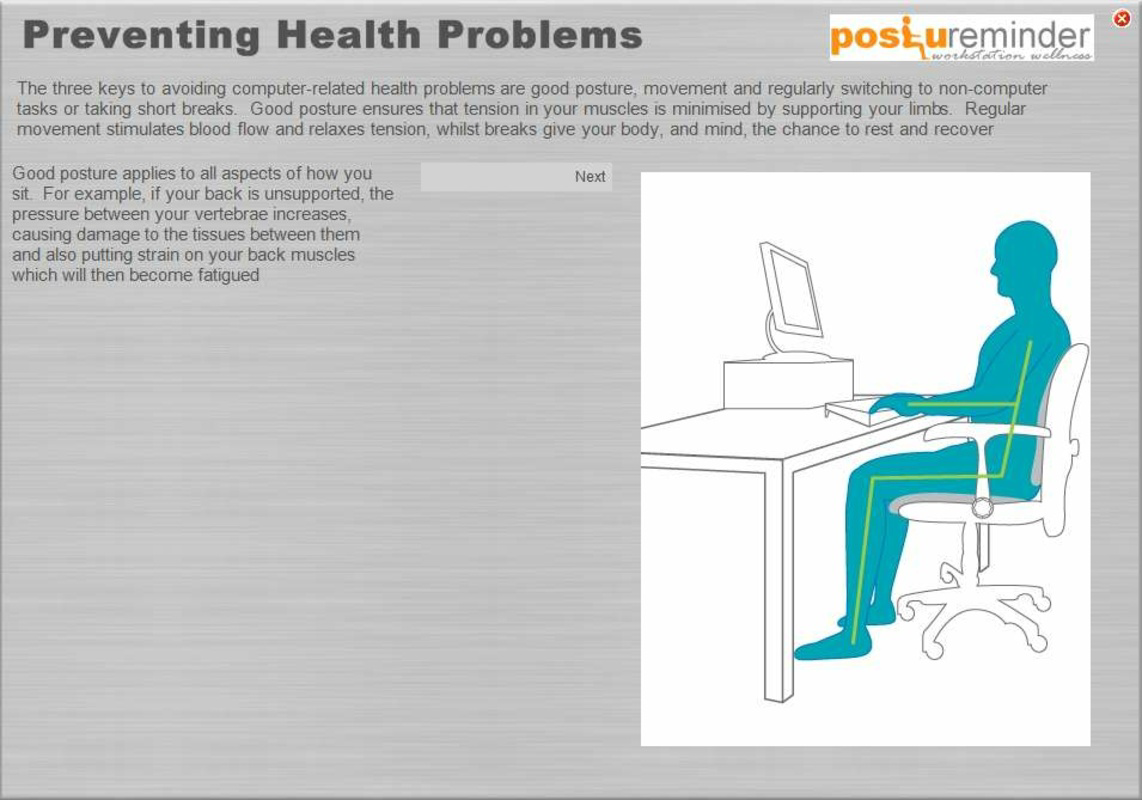
- Posture Correction Tips: The app delivers foundational guidance on maintaining an upright, neutral spine while seated. These tips cover alignment of the head, shoulders, and hips, helping users develop awareness of correct sitting posture. Regular access to this content supports habit formation over time.
- Break Reminders: Scheduled notifications prompt users to pause their work and stand up for a few minutes. These reminders are designed to encourage movement, which helps improve circulation and reduce muscle stiffness from prolonged sitting.
- Webcam Calibration: Using the device’s webcam, the app performs a posture assessment to detect deviations such as slouching or improper seat height. Real-time alerts allow immediate correction, enhancing user engagement and awareness.
- Long-term Health Focus: PostureMinder educates users on the cumulative impact of poor posture, including potential spinal misalignment and chronic pain. This educational component supports preventive health strategies rather than reactive solutions.
- User-friendly Interface: The app features a clean, intuitive layout that simplifies navigation. Even users with limited technical experience can easily access features, view tips, and respond to reminders without confusion.
For example, a remote worker might use the webcam calibration feature before starting a long meeting to ensure they are properly aligned. Later, a break reminder could prompt them to stretch, reducing strain on the lower back. Over time, consistent use of these features can contribute to improved physical well-being and reduced discomfort.
Interface, UX & Performance
PostureMinder presents a minimalist interface with clearly labeled sections and straightforward navigation. The design prioritizes functionality over visual complexity, allowing users to access posture tips, view reminders, and initiate webcam calibration with minimal effort. The layout adapts well to various screen sizes, ensuring usability across different Android devices.
Although the developer did not list formal performance metrics, the app’s lightweight file size of 25.4 MB suggests efficient resource usage. Users can expect smooth operation on mid-to-high-end Android devices, with minimal impact on battery or memory. On older or lower-end models, performance may vary, but no specific limitations were disclosed.
Responsiveness is consistent across core functions: notifications trigger reliably, and the webcam calibration process completes in a reasonable timeframe. Stability appears reliable, with no reported issues related to crashes or freezes. The app maintains a steady connection to the device’s camera during calibration, which is essential for accurate posture feedback.
Platform Compatibility & Technical Requirements
PostureMinder is available exclusively on the Android platform. The current version is 1.5.2, with a file size of 25.4 MB. The developer did not specify minimum OS requirements or device compatibility details. However, given its release date in 2012 and continued availability, the app likely supports a broad range of Android versions, including those from the past decade.
Compatibility with modern Android devices is expected, but users should verify system requirements directly through the app store. The app’s reliance on the webcam indicates it is optimized for devices with front-facing cameras, such as smartphones and tablets. No additional hardware or permissions beyond camera access were mentioned.
Pros and Cons
- Free to download and use with no in-app purchases
- Webcam-based posture calibration offers real-time visual feedback
- Break reminders promote healthy movement habits
- Simple, intuitive interface suitable for all skill levels
- Long-standing presence in the health and fitness category
- Only available on Android; no iOS version currently listed
- Specific OS and device compatibility details were not disclosed
- Relies on webcam functionality, which may limit use in low-light conditions
- No integration with wearable devices or health tracking platforms
- Limited information on update frequency or future development plans
FAQ
Is PostureMinder safe to use with my webcam?
Yes, the app uses the device’s camera solely for posture assessment and does not store or transmit video data. All processing occurs locally on the device.
Can I use PostureMinder on my tablet?
Yes, as long as your tablet runs Android and has a front-facing camera, the app should function properly.
Does the app require an internet connection?
Basic features like reminders and tips work offline. However, webcam calibration may require a stable connection for optimal performance.
How often should I calibrate my posture?
It is recommended to perform a calibration before starting a long work session or whenever you feel discomfort. The app does not enforce a fixed schedule.
Is PostureMinder suitable for students?
Yes, students who study for extended periods at a desk can benefit from posture guidance and break reminders to reduce strain.
Final Thoughts
PostureMinder stands out as a focused, practical solution for individuals seeking to improve their sitting posture and prevent long-term musculoskeletal issues. Its combination of educational content, real-time webcam feedback, and timely break reminders makes it a valuable tool for remote workers, office professionals, and students alike. While the app lacks modern integrations and platform diversity, its core functionality remains effective and accessible.
For users committed to maintaining health in a sedentary lifestyle, PostureMinder delivers consistent value without cost. The user-friendly design and long-term development history reinforce its reliability. If you're looking to enhance your desk-based work routine with simple, science-backed habits, this app is worth considering.
Download PostureMinder now
Guides & Tutorials
How to install PostureMinder
- Click the Download button above.
- Once redirected, accept the terms and click Install.
- Wait for the PostureMinder download to finish on your device.
How to use PostureMinder
This software is primarily used for its core features described above. Open the app after installation to explore its capabilities.
User Reviews
No reviews yet. Be the first to share your experience.
You may also like
more
Que no te pillen¡
About !Que no te pillen¡Reviewed by Jason A. BilbreyShow MoreShow Less

3D Combat Zone
About 3D Combat ZoneOriginally released in 1983, 3D Combat Zone immerses players...

666: El día del portal
About 666: El día del portalOn June 6, 2006, Agent P. Stone uncovers a sinister...

80 in 1 Best Flash games
About 80 in 1 Best Flash games 80 in 1 Best Flash games is a collection of 80 fl...

ABYSS SEEKERーーWhat Do You See Deep in The Abyss
About ABYSS SEEKERーーWhat Do You See Deep in The AbyssIn ABYSS SEEKER, players...

ACA NEOGEO THE KING OF FIGHTERS 2002 for Windows
About ACA NEOGEO THE KING OF FIGHTERS 2002 for WindowsTHE KING OF FIGHTERS 2002,...